

How To Set Up Tecno K7
Howdy dear esteemed readers. I am glad to have you here. Welcome ones again and all that I tin assure you is that yous are going to detect this article very helpful and a solution to your problem. In today'southward commodity, I am going to show you the simplest method on How to Bypass FRP Lock on Tecno Spark K7 smartphone. Then if y'all are having this trouble, stay locked and you are going to learn on how to bypass FRP on Tecno Spark K7 the easiest way. Kindly also cheque my previous article How to bypass FRP on Tecno Pop 2 BB2 using Tecno popular 3 BB2 DA file.
Call up that the information contained in this article is purposefully for educational purposes and should not exist used in any illegal way. FRP means Mill Reset Protection. This way of protection was ready in identify past Google to protect Android smartphones from theft and being used later on being hard reset. But since nosotros are forgetful in nature, at some point we forget what our Google account is and when we reset our phones, we face the FRP menace. And that is where such an article becomes useful in the case where you want to bypass FRP Lock on your Tecno K7.
Methods on How To Featherbed FRP Lock On Tecno Spark K7
Many people opt to employ the manual method to bypass FRP on smartphones. Yes I have to hold that it works on various phones. This method involves weaving through some loop holes in the Android system to get to the internet and downloading some apps that will have you sign in to a Google account. The downside of it is that it is very hard and time consuming. Anyone who has always tried that volition agree with me.
The second method is the easiest of all and can only take less than 2 minutes and this includes using software that can help featherbed the FRP lock. This method is the centre of our article today. Allow us look at it. You can also run into another i of my commodity on How to Flash D light M100 smartphone and remove Pay Joy lock.
How To Bypass FRP Lock On Tecno Spark K7 Using a Computer
The easiest mode to bypass FRP on Tecno K7 is using flashing software. In this article, I am going to show you How to Featherbed FRP Lock on Tecno K7 using the simplest way ever. Just before that, the following are the things you will be required to accept:
Requirements
- Windows PC
- Miracle two.82 tool
- USB Drivers
- USB data cablevision
After making sure you have the to a higher place listed requirements, now follow keenly the following steps on How to Bypass FRP Lock on Tecno K7. If interested, bank check also another article on how to remove security lock on Tecno T372 characteristic phone using a calculator.
Step one
On your windows PC, launch your Miracle box 2.82 tool. If you take a latest version more than 2.82, then it should work fine. If you have a lower version, you tin can as well requite it a try though I cannot assure you it volition work because personally I take only used version 2.82.

Step ii
On miracle box interface, click on the "Read info" button. Click on the START push button. Switch off your Tecno K7 smartphone and then connect your phone to the PC. As before long as your phone is detected, Phenomenon box should observe your phone and should be able to read information on your phone every bit shown beneath.

Stride 3
Now, after noticing that Miracle box tin can read your phone's data, now allow us proceed to remove FRP on Tecno K7. Now, on Miracle interface, click on "Unlock/Fix" push. Then now click on "Clear setting/FRP"

Now, click on the START push. Only like in footstep 2 higher up, switch off your phone; connect your phone to the computer via USB data cablevision. Your telephone be detected and FRP settings will be reset and as soon as y'all meet "Done",
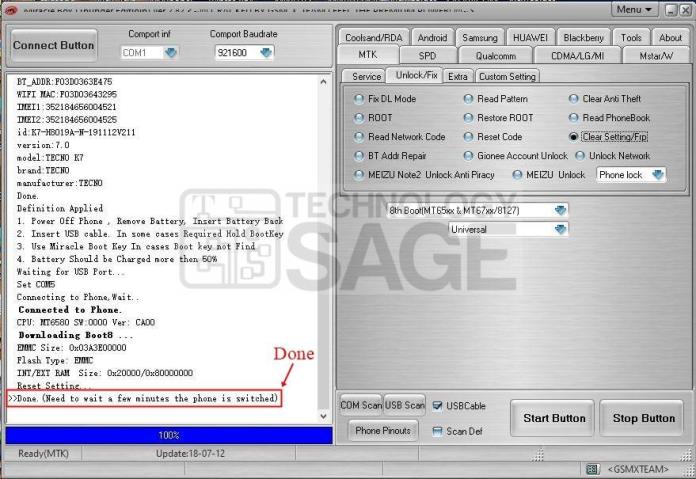
Disconnect your phone from the figurer, power it upwardly and complete the start up settings. That is the simplest method on How to Bypass FRP Lock on Tecno K7.

How To Set Up Tecno K7,
Source: https://www.technologysage.com/how-to-bypass-frp-lock-on-tecno-spark-k7/
Posted by: byrdruld1962.blogspot.com
0 Response to "How To Set Up Tecno K7"
Post a Comment